
Evidence workstation software: a buyer's guide
Short answer: an evidence workstation is local software that preserves originals, records a SHA-256 hash at intake, keeps an append-only audit record of material case and custody events, and exports a package a reviewer can verify on their own machine, no install required.
Evidence workstation software: a buyer's guide
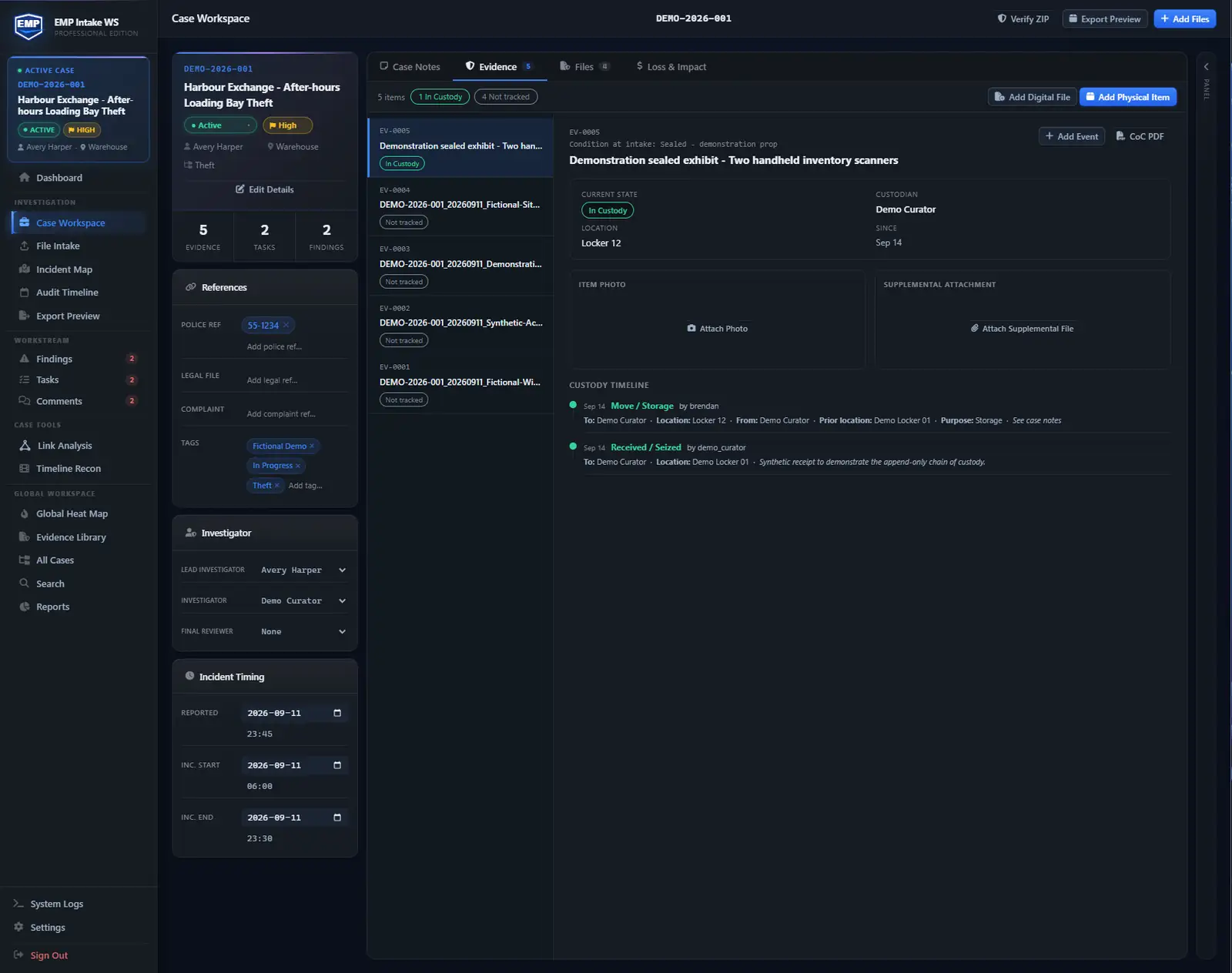
Evidence workstation software is a single-workstation application that takes in digital evidence, hashes and preserves each file at intake, records material case and custody events, and produces a verifiable export package, sized for one investigator rather than an enterprise case-management platform. This guide covers what to check before you buy and how it differs from a six-figure investigation suite. Up front: EMP is NIST SP 800-86 / 800-101 aligned (a design target, not a certification). It is tamper-evident, not tamper-proof, and it makes no claim to guarantee admissibility, because the court decides that.
~9 min read · By Brendan Foote
- An evidence workstation is a desktop tool for one investigator. It hashes files on intake, preserves the originals, records material case and custody events, and hands off a case package the next reviewer can check. No server, no team required.
- It is not a forensics tool (those pull data off devices) and not a team case-management system (those serve many investigators on a server).
- Evaluate the integrity model, audit logging, export package, whether evidence stays on your machine, NIST SP 800-86 / 800-101 alignment, deployment posture, and a real-case trial before you pay.
- Choose by where cases need to be shared: one investigator or people sharing one PC can use WS. Need shared cases, role-based access, and a multi-user audit trail? You want a team system. EMP Intake WS covers the first; EMP Intake Teams (pilot planned for 2027) the second.
What is an evidence workstation?
An evidence workstation is a desktop app installed on one licensed Windows workstation that runs the whole evidence lifecycle there. Evidence comes in, whether scans, exports from a forensic tool, email attachments, or photos off a phone, and the workstation takes responsibility for four things:
- Integrity. Every file is hashed on arrival and the original is preserved. The investigator works on a copy; if an original ever stops matching its recorded hash, the system shows it.
- Audit. Material case, evidence, custody, and export actions record a timestamp, the actor, the object, and the result. This is the log a reviewer asks for first.
- Export. When the case goes to counsel, a regulator, or an accreditation visitor, it leaves as a self-contained package the recipient can open with no EMP software installed.
- Posture. Case content stays in your controlled storage until you choose to share it. A recipient package can include copies of selected originals.
What it's not
Not a digital forensics tool
Forensics tools (Cellebrite UFED, EnCase, Magnet Axiom, FTK) acquire and analyze the contents of devices: they image a drive bit-for-bit, pull messages off a phone, parse cloud-acquisition exports. Their output is data.
A workstation manages the case file around that output: what came in, when, from whom, with what hash, who handled it, what got exported. The forensic tool acquires or analyzes source data; the workstation manages what happens next. Most investigators run both, in series.
Not an enterprise case-management system
i2 Analyst's Notebook is visual-analysis software with standalone desktop and collaboration options. Shared case-management and records platforms address different needs. Check deployment, permissions, collaboration and integrations in the product and plan you are evaluating.
A workstation is built for one investigator or several authorized users sharing the same Windows workstation, no server, no IT change cycle to onboard. For shared access across PCs, confirm the Teams pilot and supported case-transfer workflow before planning a migration.
The seven evaluation criteria
Check these in order. Each is a question to put to the vendor, and a place where weak products fail loudly.
- Integrity model. Does it hash every file on intake? SHA-256 is the floor; MD5 and SHA-1 are weak. Is the original preserved so any change is detectable on re-hash? Do working copies and derivatives live as separate objects that point at the original by hash? “We hash sometimes” is a fail.
- Audit logging. Material case, evidence, custody, administrative, and export events get a timestamp, an actor, the object touched, and the result. Append-only, and exportable. Standard and Professional can include Audit Timeline in the export. A log you can only see inside the app cannot be handed to anyone.
- Export package. The export is what the next reviewer holds: one manifest row per object (hash, type, intake date, source) plus the audit record and case data, all readable without the software installed. Documented formats (PDF, JSON, and a sha256sum-compatible text manifest) beat proprietary blobs. Ask for a sample export before you buy.
- Stays on your machine. Does case data ever leave the workstation? File content, file paths, case metadata: none of it should upload. EMP may contact Falcrex-operated or approved services for licensing, update delivery, and online maps. These requests do not upload case evidence.
- NIST SP 800-86 / 800-101 alignment. The federal forensic guides describe a lifecycle (acquisition, examination, analysis, reporting) with integrity controls at each stage. Ask the vendor to walk you through how the software maps to each one. If they can't, the alignment is a slogan.
- Deployment posture. Where does it run, and where does the case data actually live, the vendor's cloud or local on the workstation? EMP runs on a Windows desktop with no inbound access and no admin rights on the host network. License activation needs an internet connection. File-based offline activation is available on request for fully disconnected paid workstations; trials still require online validation, and online basemaps still require network access.
- Trial availability. Can you run a real case before you pay, or must you commit off a demo video and a sales call? EMP Intake WS ships a 14-day Professional-tier trial, no credit card.
NIST alignment, in practice
SP 800-86 informs the forensic-handling workflow. SP 800-101 concerns mobile-device forensics; EMP references it for handling and exporting evidence acquired elsewhere, not device extraction. On a workstation that maps cleanly: intake records the source, investigator, and hash; working copies derive from the preserved original and never touch it; material actions across the case are written to the audit record; and selected exports can include the manifest and entitled audit content for recipient review.
EMP is NIST SP 800-86 / 800-101 aligned as a design target, not a certification, and is not FIPS-validated.
A representative case workflow
The investigator is a workplace-investigations consultant; the case is a harassment allegation at a 40-person company.
- Intake. Three interview videos, an HRIS export, badge-access logs, 12 email threads, four prior personnel files, all ingested, hashed, originals preserved.
- Examination. Externally produced transcripts are ingested as their own evidence files, hashed and preserved at intake like everything else. Email threads are tagged to timeline events. The investigator touches nothing but working copies.
- Analysis (Professional). A timeline links interview statements to badge-access events, and the link-analysis view surfaces a scheduling overlap two interviewees described independently.
- Handoff. The selected export, with Manifest enabled and entitled audit content included, goes to outside counsel. Counsel opens the manifest, recomputes the hashes with any SHA-256 tool, and walks the audit trail. No EMP software on their side.
The handoff fits in one line: “The audit trail is in the package. The hashes verify. The originals are unchanged from intake.”
Why a shared folder isn't enough
Shared storage can provide access controls, version history and activity logs, depending on the service and configuration. It does not automatically combine intake hashing, retained originals, entered custody records and recipient verification. Evaluate the controls and retention you actually use.
When to move from workstation to team
You've outgrown a single workstation when more than one investigator regularly touches the same case file, when you need central audit attribution across the team, when oversight requires per-person roles and permissions, or when several workstations are running EMP WS and the team wants one shared workspace instead of separate exports per person.
Choose WS for a local workstation and Teams for a customer-hosted shared workspace. Confirm the supported case-transfer workflow and current pilot availability with Falcrex before planning a migration.
A defensible buying process
- Run a 14-day trial on a real case. Not demo data. Use a closed case, or a stripped-down open one, and run intake, working copies, the audit log, and the export end to end.
- Open the export outside the software. A good export stands on its own. Give it to someone who has never seen the software, have them open the manifest and rehash two or three files with PowerShell or sha256sum, then read the audit trail cold.
- Ask the vendor one precise question. “Show me the audit entry for this export, and show me what stops someone from editing its timestamp.” A clean answer tells you the rigor is real, not bolted on for the demo.
What is evidence workstation software?
A desktop tool for one workstation that runs the whole evidence lifecycle on one machine: intake, hashing, preserved originals, working copies, audit logging, and export packaging. It combines evidence-handling steps that would otherwise need separate tools and procedures. Shared access across PCs requires a multi-user workspace.
How is an evidence workstation different from a case-management system?
A case-management system is built for teams: shared cases, role-based access, central audit attribution, many people at once. A workstation supports one local workspace on one PC, used by one investigator or several authorized Windows users sharing that machine, with no server to run. Both produce a verifiable export; the workstation just skips the server.
Is evidence workstation software the same as digital forensics software?
No. Forensics tools (Cellebrite UFED, EnCase, Axiom, FTK) pull data off devices: phones, drives, cloud accounts. A workstation manages the case file around that output. Most investigators need both, in series.
What does “NIST-aligned” mean here?
NIST alignment is a design target, not a certification. SP 800-86 informs EMP’s forensic-handling workflow. SP 800-101 references concern handling and exporting mobile-device evidence acquired elsewhere, not extraction from a device. Your own policies and operations set your compliance posture.
Keep reading or try EMP Intake
Put defensible chain-of-custody intake to work on your own matters.