
A single store apprehension caseload, every file accounted for.
Turn a single store's apprehension caseload into packets prepared for review. EMP hashes imported clips, reports and recovery photos, records physical merchandise separately, and packages the selected files for hand-off.
The DA prosecutes the file you hand them
A clip with broken metadata, two managers' names on one incident, no custody trail on the recovered goods. Missing provenance or handling records can make a referral harder to review. Preserve source files and document their handling from intake.
Loss prevention evidence management is how a single store's high-volume apprehension caseload turns into case packets prepared for prosecutorial review, and organized civil recovery files for review. The apprehension is the easy part. Then each case scatters: the CCTV clip sits on a DVR export, the report lives in one manager's inbox, the recovered merchandise gets a photo on someone's phone, and by the time the DA looks at it, nobody can say what came from where. EMP keeps each apprehension in its own case file, each imported file hashed on intake, with physical items recorded separately, exported with a manifest the DA's office can recompute. For multi-store, regional organized retail crime, see the retail investigations page.
Where EMP fits in the workflow.
Your loss-prevention packet might include
- ✓ The POS exception
- ✓ The DVR clip
- ✓ The apprehension report
- ✓ Recovery photos
- ✓ The civil-recovery or DA export
Single-store apprehension packet
One apprehension becomes one packet: exported CCTV, witness statement, apprehension report, civil-demand letter, and merchandise-recovery record, fingerprinted on receipt and assembled into one export package the DA's office can recompute. Built for the volume a single store generates, one clean case at a time.
Civil recovery
Hand off a clean recovery package per apprehension: selected original files and the civil-demand letter, with Manifest enabled and entitled audit content. The recipient can review and check the files without EMP. Import into its own system depends on supported formats. This is the bread-and-butter LP workflow: high apprehension volume, a recovery demand on each.
Internal shrink
POS exception exports, exported video review, and the interview record into one case with a continuous audit trail. Bridge to HR or corporate-security workflows where a matter crosses lines.
Repeat-offender file
When the same subject is apprehended at your store again, link the prior apprehensions so the pattern at this location is documented for the DA, without reaching across stores.
Supply-chain & back-of-house loss
Stockroom incidents, delivery-driver inquiries, and vendor-returns fraud tied to the store. Evidence comes in from several parties; EMP keeps each original untouched and logs where it came from.
How a loss-prevention case moves through EMP
- Open the case at apprehension. The POS exception export, the DVR camera clip, the apprehension report, and the merchandise-recovery photos import together. Each is hashed (SHA-256) at intake, so the original is preserved and you work from a copy.
- Build the case around the suspect and the goods. Tag the apprehended subject, the recovered merchandise, and the witnesses, and link the POS exception to the camera clip that shows the same transaction, so the loss and the footage are tied, not asserted.
- Reconstruct the apprehension on a timeline. On Professional, line the POS exception timestamps up against the camera clip on one timeline: the exception, the concealment, the exit, the stop, in order.
- Generate the Export Package for the DA and the civil demand. One ZIP with the selected originals and reports. Enable the manifest to include file checksums and the verifier; Standard and Professional can also include the Audit Timeline PDF and machine-readable audit data.
- The recipient checks the files. The recipient can compare the packaged files with the manifest using the verifier. No EMP install required.
Feature availability: Standard adds Chain of Custody, Audit Timeline and Incident Maps. Timeline Recon, Link Analysis and custom report branding require Professional. Core includes case management, file intake and exports.
Case workspace example
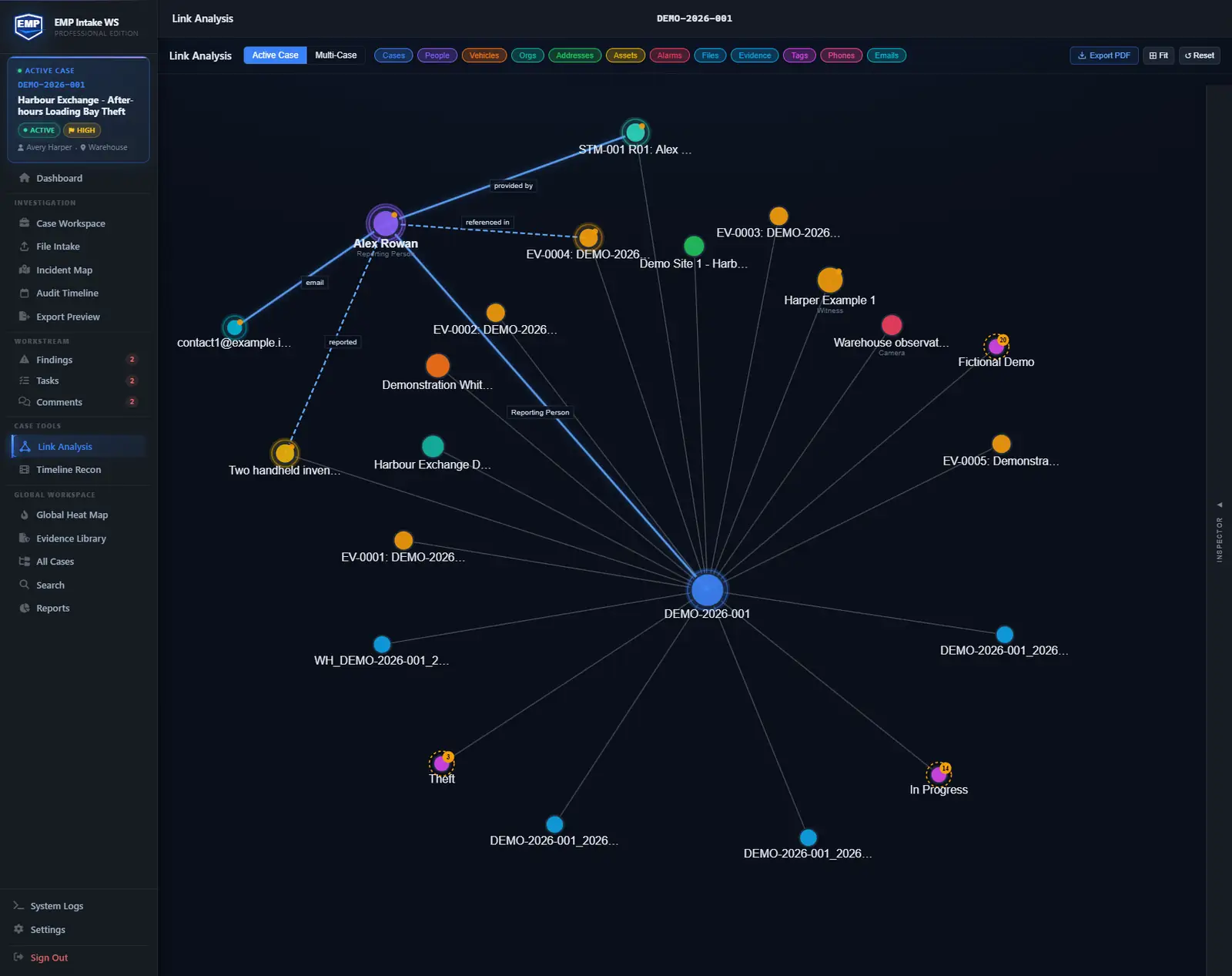
Repeat theft case. Track suspect descriptions, vehicles, the store, receipts, CCTV clips, POS records, recovered items, and police-handoff notes. On Professional, use Link Analysis to review connections between people, places, vehicles, and assets across the case, then hand off a verifiable export.
Ingests your exports. Doesn't replace your tools.
EMP organizes records exported by your POS, video and retail systems. Import exception reports, clips, recovery photos and shrink audits, then prepare a package for review.
- CSV exports from your POS exception system via file import
- Video exported from your CCTV/VMS, imported as case evidence
- Civil-recovery firms: files and checksums for review without EMP; native import depends on the receiving system
- Law enforcement: export packages structured for DA submission, ready for the prosecutor's office to open and verify on their own
- Retail audit / shrink reports (CSV) imported, with a record of each file taken the moment it lands
Questions these teams ask first.
Can EMP handle the volume an LP team generates?
Capacity depends on your workstation, file sizes and the work you run. Test a representative store caseload on the machine you plan to use. EMP Intake WS is licensed per workstation; Teams is designed for shared cases across workstations.
Does my evidence leave my workstation?
No. EMP Intake WS is a local-first Windows desktop application. Case data lives in a SQLite database on the workstation. No cloud upload and no telemetry of file contents. The only calls that leave are a licensing check on activation and validation, an optional update check, and map-resource requests when map views, Timeline Recon playback, or exports use online basemaps. Map requests go through a Falcrex-controlled map delivery service using Cloudflare infrastructure (see the Trust page for details). None transmit case data.
Can I import our POS exception exports?
CSV exports from your POS exception system land via the file-import workflow. Each file is fingerprinted at intake, so the imported record is part of the custody trail from the moment it enters the case. EMP imports the file; it does not integrate directly with the POS system.
What does a package handed to the DA actually contain?
The selected evidence preserved bit-for-bit, a manifest with every per-file hash, and reports. On Standard and Professional the package can also include the Audit Timeline PDF and entitled machine-readable audit data. EMP calculates the SHA-256 of the finished ZIP after archive creation and records that value outside the ZIP in the package and export audit records; the exporter can provide it when exact-container verification is required. Enable Manifest to include the verifier. Recipients can check supported package contents with it; checksum tools can also check the listed files. No EMP install required.
Does the same case support criminal referral and civil recovery?
Build the export once, and the manifest and hashes make it equally verifiable for a DA submission and for the civil-demand letter on the same apprehension.
Build the case anyone can verify.
EMP Intake Workstation comes with a 14-day trial, no card and no sales call, so bring a real case and watch it stay defensible.