
Insurance-defense surveillance, from intake to export
They don't attack the surveillance; they attack the file. Evidence management for private investigators gives an insurance defense case one accountable record, from the first clip to a package the carrier can verify.
The case is solid; the file is in four places
Surveillance video on a phone, scanned reports in a cloud drive, witness statements in a desktop folder, GPS logs in an email. A subpoena lands and the next three days are a file hunt.
Evidence management software for private investigators gives an insurance defense surveillance case one accountable record, from the first clip and field note to the package you hand the carrier. When did you get this clip? Did anyone touch it before the carrier saw it? A claimant case rarely turns on what you found; it turns on whether you can account for it. EMP gives the case one record where those questions already have answers, and an export package the carrier can verify for themselves. The same workflow carries your other work too, from background and skip trace to domestic matters.
Where EMP fits in the workflow.
Your investigation packet might include
- ✓ Surveillance video
- ✓ Field notes
- ✓ Subject media
- ✓ Dates and GPS where available
- ✓ The verifier-ready export
Insurance-defense surveillance package
Claimant surveillance video, photos, GPS logs, and field notes into one case file, hashed at receipt and bundled into a verifiable export package. Reconstruct the timeline and place events on a map from the same case file, then hand the carrier a package it can recompute to confirm nothing moved.
Verifier-ready surveillance intake (general)
The same intake-to-export workflow for any surveillance matter: media hashed at receipt, timeline and map built from one case, a verifiable package out the door.
Witness statement workflow
Recorded interviews, signed statements, and follow-up notes organized per witness with a continuous audit trail.
Domestic / family-law support
Client-supplied materials imported as case evidence and preserved from intake, with the source of each item recorded.
Skip trace & background
Public records and third-party reports with source attribution preserved for every finding, so each result is traceable later.
How a private-investigator case moves through EMP
- Intake the surveillance off your devices. The video off the camera, the photos and GPS off your phone, and your field notes import into one case. Each file is hashed (SHA-256) at receipt, so you can answer the first question opposing counsel asks (when did you get this clip, and did anyone touch it since) with a record, not a recollection.
- Build the case around subjects and sources. Tag the subject, the locations, and each source, and attach source attribution to every item so each finding stays traceable later.
- Reconstruct surveillance on a timeline and a map. On Professional, align supported video and event logs in Timeline Recon and add a retained map clip for synchronized playback. Plot locations and movement paths in Incident Maps, and preserve GPS export files as source evidence.
- Bundle the verifier-ready Export Package. One ZIP with selected originals and reports. Enable Manifest for file checksums and the verifier; Standard and Professional can also include Audit Timeline and supported audit data. Import into a review platform depends on its supported formats.
- The carrier or opposing counsel verifies it themselves. They recompute the hashes with sha256sum or the /verify tool. Nothing moved since intake, and the file stays verifiable under challenge. No software guarantees admissibility (the court decides) and no EMP install is needed to check the package.
Feature availability: Standard adds Chain of Custody, Audit Timeline and Incident Maps. Timeline Recon, Link Analysis and custom report branding require Professional. Core includes case management, file intake and exports.
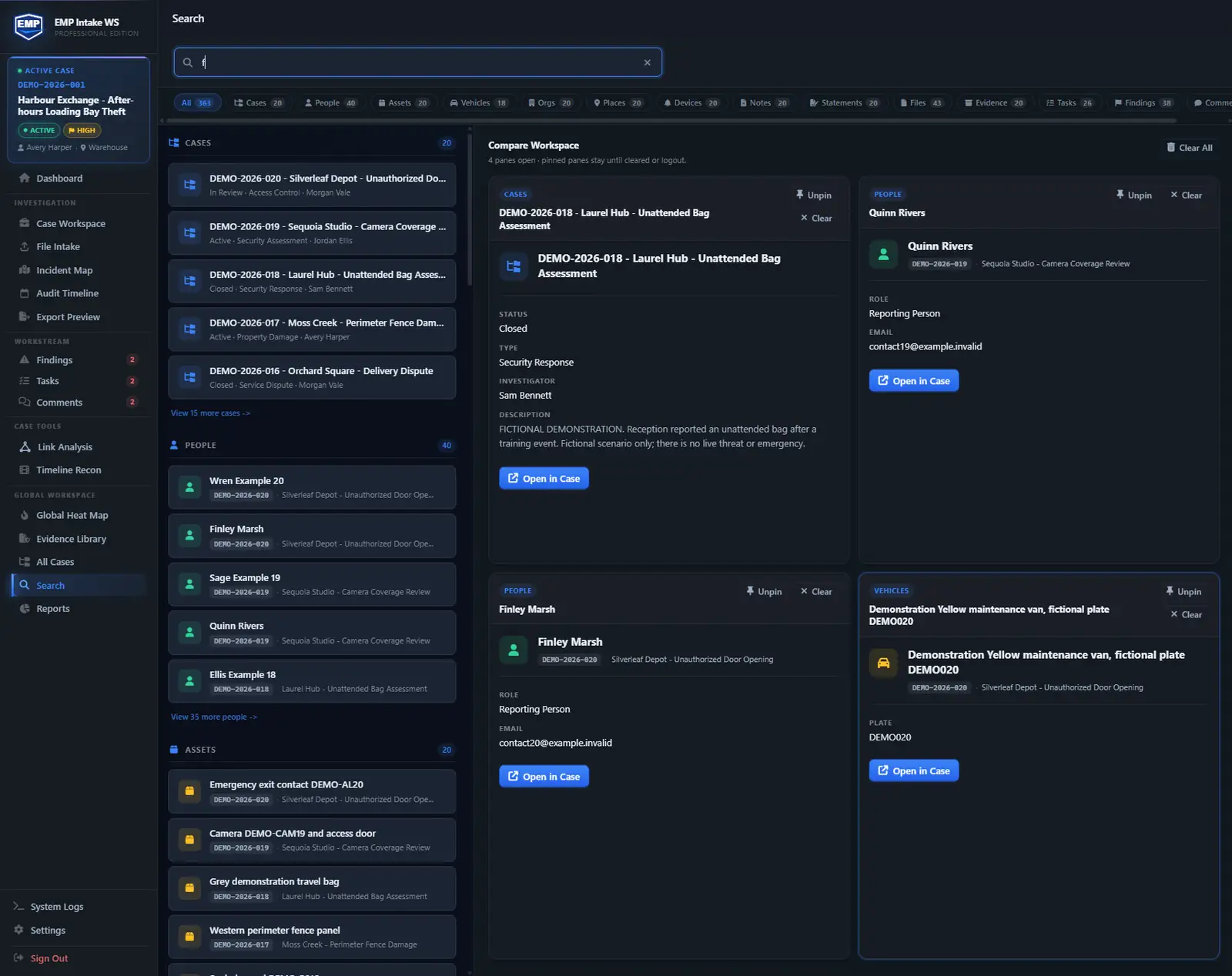
Case workspace example
Surveillance and locate case. Track the subject people, vehicles with plates and sightings, places, surveillance clips, and field notes with dates and GPS as case objects, then run link analysis to connect who meets whom and where. Keep findings and file notes tied to the evidence that supports them so nothing rests on memory. Admissibility is the court's call, so the close is a verifier-ready export the other side can check without EMP installed.
Ingests your exports. Doesn't replace your tools.
EMP organizes files from your cameras, phone and research sources. Import surveillance video, photos, GPS export files, scanned reports and portal documents, and record where each came from.
- Surveillance video formats (MP4, MOV, AVI) fingerprinted as they come in, so a copy can be checked against the original later
- Mobile-device exports from your phone (photos, GPS, voice memos)
- Scanned reports and PDFs imported with SHA-256 at intake
- Export packages of preserved originals an attorney can bring into eDiscovery
- Public-records and licensing-portal documents added by manual file import
Questions these teams ask first.
Is evidence handled this way admissible?
No software guarantees admissibility. The court decides that. What EMP gives you is the trail to argue it: hashed originals, preserved source files, an append-only audit log, and a manifest the other side can check for themselves.
Can I work offline?
For case work, yes. EMP Intake WS runs locally on your Windows workstation. No cloud upload is required. Core case management, evidence, notes, timelines, and exports remain local and can continue without a continuous connection. Licensing operations, update checks, and online maps may require internet access. The only calls that leave are a licensing check on activation and validation, an optional update check, and map-resource requests when map views, Timeline Recon playback, or exports use online basemaps. Map requests go through a Falcrex-controlled map delivery service using Cloudflare infrastructure (see the Trust page for details). None transmit case data.
How large can a case get?
Practical capacity depends on hardware, storage, file sizes and the operations you run. Test a representative surveillance case on the intended workstation.
Does it integrate with surveillance camera systems?
It imports common video formats from any source. You bring the file, EMP preserves it with a hash on intake. There's no direct camera-system integration; the file is the unit of evidence.
What happens to my data if I'm subpoenaed?
EMP doesn't store your data anywhere except your workstation. There's no SaaS vendor holding it. Your organization retains the records and manages required disclosure from its own environment, with advice from counsel.
Build the case anyone can verify.
EMP Intake Workstation comes with a 14-day trial, no card and no sales call, so bring a real case and watch it stay defensible.