
The record a Title IX or Clery review needs, in one file
Serve a Title IX review, Clery reporting, and a local agency from one record. Campus security evidence management assembles every interview, card swipe, and clip into one auditable file each reviewer can verify.
Three reviewers, three definitions of the file
Title IX wants verbatim interviews and equitable access. FERPA limits who sees what. And when a case outgrows campus jurisdiction, the local agency needs a package it can actually open. A reviewer doesn't take your word that the record is clean; they want to check it.
Campus security evidence management has to serve every reviewer at once: a Title IX review wants verbatim interview records and equitable access, Clery reporting wants clean source incidents, and a local agency needs a package it can open. The conduct office has its notes, residence life has the card swipes, campus PD has the body cam clip, and the Title IX coordinator has the recordings. Then a student requests their file, or a federal reviewer asks who handled what, and someone spends a week stitching it together. EMP assembles each campus case in one auditable file, so the answer is already attached to the evidence.
Where EMP fits in the workflow.
Your campus-security packet might include
- ✓ The incident report
- ✓ Location and campus map
- ✓ CCTV
- ✓ Party and witness statements
- ✓ The conduct or review trail
- ✓ A scoped export per party
Title IX & Clery campus case file
Verbatim interview records, complainant and respondent statements, and documentary evidence land in one campus-security case with a continuous audit trail. It assembles the record an equitable, timely Title IX review needs and feeds clean Clery source data.
Student conduct investigation
Hearing records, witness statements, and supporting documents in one case. It keeps an attributed record of who added, changed and exported what, ready for the day a student requests their file.
Clery source records
Keep incident records categorized and searchable, with imported source files hashed using SHA-256 at intake. When it's time to build the annual Clery numbers, the source data behind them is already clean, and each file carries the record of what it is and whether it changed.
Behavioral / threat review
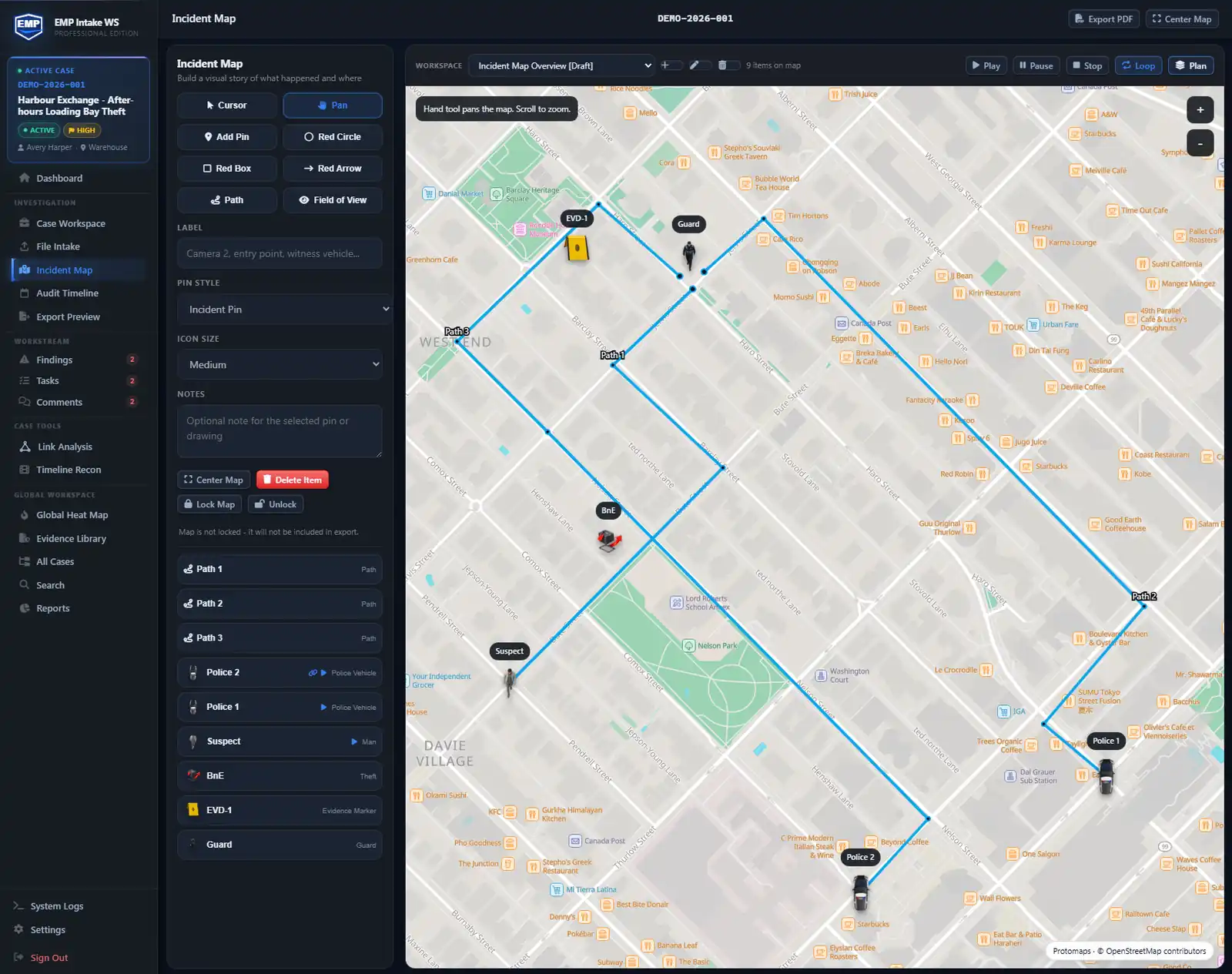
Hold the related reports in one case so the timeline and the incident map show the pattern across parties, locations, and time. Reconstructable later, not reassembled from memory.
Law-enforcement hand-off
When a case outgrows campus jurisdiction, hand off selected evidence and reports, with Manifest enabled and entitled audit content. The local agency recomputes the hashes with stock tools. If one byte changed, it shows. No EMP install required.
How a campus-security case moves through EMP
- Open the case and gather the record. The Title IX coordinator's verbatim interview recordings, the conduct-office reports, residence-hall card-access logs, and the campus-PD camera clip import into one case, each hashed (SHA-256) at intake so originals are preserved.
- Build the case around the parties. Tag complainant, respondent, and witnesses, and link each statement and document to the party it concerns, the record that has to read equitably to a Title IX reviewer.
- Reconstruct the incident on a timeline. On Professional, align imported card-access logs and camera footage in Timeline Recon so a reviewer sees who was where, when, in sequence.
- Export a per-party package. Prepare a package scoped under your institution's process. Enable Manifest for checksums and the verifier; Standard and Professional can include Audit Timeline. Professional adds report branding. Review every included artifact before disclosure.
- The conduct board, a student, or the police verify it themselves. Each recipient can verify the files in their package. If the process requires identical disclosures, distribute the same finalized package; separately scoped contents produce different packages and checksums. If a case outgrows campus jurisdiction the local agency checks it the same way. No EMP install needed.
Feature availability: Standard adds Chain of Custody, Audit Timeline and Incident Maps. Timeline Recon, Link Analysis and custom report branding require Professional. Core includes case management, file intake and exports.
Case workspace example
Campus incident report. Track the parties, witnesses, campus locations and scenes, CCTV clips, and any loss and impact as case objects, with tasks and a conduct review trail recorded as you go. Keep careful, accurate notes that assemble the record a review needs. EMP is not a Title IX or Clery compliance guarantee. Lay the events on a timeline so the sequence is clear, then export a scoped, verifiable package for the reviewer who needs it.
Ingests your exports. Doesn't replace your tools.
EMP organizes records exported from conduct, student-information and security systems. Import incident records, card-access logs and camera clips, then prepare a reviewed disclosure package.
- CSV or PDF exports from your conduct system via manual file import
- CSV or PDF exports from your student-information system via manual file import
- Card-access exports for residence halls and academic buildings (CSV)
- Video exported from your campus CCTV/VMS, imported as case evidence
- Export packages the local agency can inspect and ingest - nothing to take on faith
Questions these teams ask first.
How does EMP help with FERPA?
The audit log records who added, changed, and exported what on a case, each with a timestamp. Those records can contribute to handling history. Your institution must separately determine and record required disclosure details, permitted access and exceptions under its FERPA process. EMP itself is not a FERPA-compliance certification; your policies, access decisions, and deployment configuration determine your posture. Because EMP Intake WS keeps data on your workstation and doesn't transmit it to us, casework stays in your environment; security still depends on configuration, access controls, backups and handling of exports.
Does my evidence leave my workstation?
No. EMP Intake WS stays on your machine. Case data lives in a SQLite database on the workstation. No cloud upload, no AI reading your evidence. The only calls that leave are a licensing check on activation and validation, an optional update check, and map-resource requests when map views, Timeline Recon playback, or exports use online basemaps. Map requests go through a Falcrex-controlled map delivery service using Cloudflare infrastructure (see the Trust page for details). None carry case data.
Can it replace our student-conduct platform?
For some campuses, EMP is the evidence-integrity layer underneath the conduct workflow rather than a replacement for it. Conduct platforms cover workflow and hearings; EMP covers chain-of-custody and forensic rigor. EMP can sit alongside a conduct platform by preserving files exported from it. EMP imports CSV or PDF exports from the conduct system.
How do I give each party the same format under Title IX?
Use a consistent package format and review authorized contents under your institution's process. Identical disclosures require the same finalized package. Separately scoped packages can share a format while containing different files; verifying one does not establish that it matches another.
Can EMP run entirely on our infrastructure?
EMP Intake WS runs entirely on a Windows workstation in your environment, which may be shared locally by authorized users. There is no SaaS dependency for casework. For shared, multi-user deployments across a campus safety office, EMP Intake Teams (pilot planned for 2027) is designed to run the same integrity model on PostgreSQL infrastructure you control.
Build the case anyone can verify.
EMP Intake Workstation comes with a 14-day trial, no card and no sales call, so bring a real case and watch it stay defensible.