
Incident reconstruction software
Incident reconstruction software brings logs, video and retained map clips onto a working timeline. Source offsets help reconcile different clocks while preserving the original values and files.
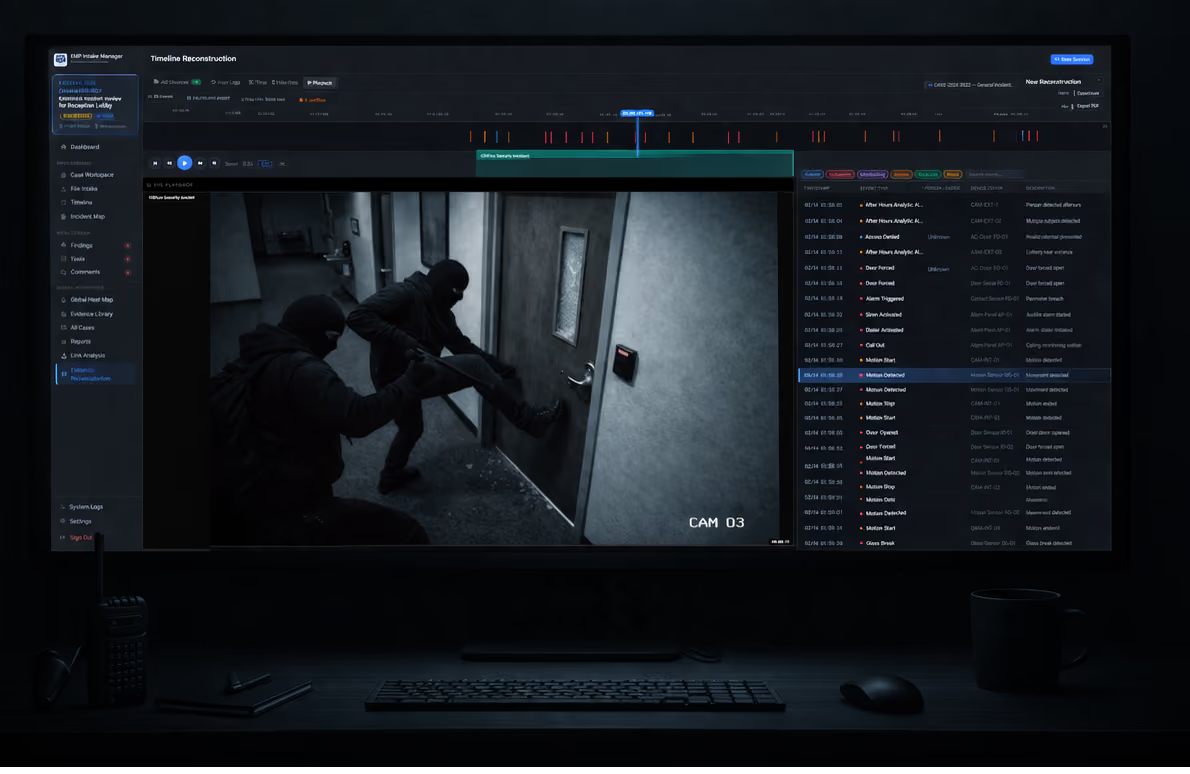
Incident reconstruction software: timelines, maps, and link analysis
Incident reconstruction software assembles collected evidence into a coherent account of what happened, across three views built on one evidence base: a timeline of when, a map of where, and link analysis of who. The views share that evidence, but each is built and updated on its own; there is no live cross-view sync. This guide covers the views every reconstruction needs and how to tell a tool that produces a defensible export from one that just snapshots its own screen. For investigators who already have the evidence and need to assemble it.
~12 min read · By Brendan Foote
- Incident reconstruction software arranges evidence you already have into three views: a timeline (when), a map (where), and a link graph (who, with whom, through what).
- What makes it defensible: each event, pin, and edge can trace back to a source object with a hash and an audit trail. All of them read from that same hashed, preserved spine, but each is built and updated independently. Live map edits do not automatically update log events; retained map clips can play beside video and logs in Timeline Recon.
- The export is the real test, not the screen. Hand the package to someone who has none of the software installed. Can they follow what happened, and can they re-hash a file against the manifest? If not, you bought a screenshot.
- Most investigators still do this in spreadsheets, map tabs, and whiteboard photos. That works until the evidence changes and you have three things to fix by hand.
- EMP Intake Professional includes Timeline Recon and Link Analysis; Standard and Professional include Incident Maps. EMP Intake Teams (pilot planned for 2027) brings the same to shared cases.
What is incident reconstruction software?
Incident reconstruction software takes the evidence you've already gathered (interviews, logs, photos, video, dispatch records, badge access, forensic acquisitions) and helps you assemble it into an account of what happened. It sits downstream of acquisition tools (Cellebrite, EnCase, Axiom) and upstream of the report you write.
What each part of the record must carry into the export, at a glance:
| Part | Question it answers | Evidence risk | Export requirement |
|---|---|---|---|
| Timeline | When did each event happen? | An event with no source object is a slideshow, not a record. | A summary PDF plus the complete normalized events CSV, metadata and retained sources. |
| Incident map | Where did it happen? | Map requests can reveal the approximate area viewed; they should never carry case content. | Locked map as PNG/PDF. |
| Link analysis | Who connects to whom, through what? | An edge with no evidence behind it is an assertion. | Link-analysis PDF; ask for GraphML/GEXF/JSON if you need it re-renderable. |
| Audit log | Who did what to the case, and when? | No log means no way to show the record was not altered. | Audit Timeline PDF, plus machine-readable audit data JSON, inside the package. |
What sets it apart from generic “investigator software” is three views over one evidence base. The timeline answers when. The map answers where. The link graph answers who, with whom, through what. Same evidence, three lenses, not three separate copies you keep in sync.
Timeline, map, link analysis
Each view is a different question put to the same evidence. Here is what each one does, and what to ask any tool that claims to provide it.
Timeline, answers WHEN
A timeline orders events in time. Each one has a timestamp, a description, and the part that matters: a source, the evidence object it came from. An interview statement. A badge swipe. A CCTV frame. A dispatch call. Strip out the source and you have a slideshow. Keep it and you have a traceable account of when each fact entered the case.
The hard part of a real reconstruction is that the evidence never shares one clock. Access logs, motion logs, other CSV sources, and camera footage each keep their own time, and those clocks drift apart. Strong timeline reconstruction pulls those separate sources onto one working timeline and lets you correct the drift: import a CSV, access, or motion log, apply a per-source time offset so its clock lines up with the rest, trim the windows you do not need, and drop the noise events. The resulting order reflects your chosen offsets. Record their basis and any remaining uncertainty; alignment does not independently establish the true sequence.
Video belongs on that same timeline. Add a clip, place it at the playhead where the events actually happened, and scrub the footage against the logged events around it. Scrubbing plays the video you placed, and any retained map clip on the timeline; it does not drive the live map or link-graph views, which stay independent. Every source is preserved and SHA-256 hashed as it comes in, so the timeline reconstructs the originals rather than re-cutting them.
Ask the vendor: can it import log files (CSV, access, motion) and correct each source clock with a time offset? Can you place and scrub video against the events? Can a timestamp be edited, and does the edit leave an audit trail? Does each source keep its own recorded timezone, with any reconciliation shown rather than silent? Does the event log ship in the export? EMP Intake Professional exports a Timeline Recon summary PDF, complete normalized events CSV, metadata and selected retained source, video and map assets. The PDF is a summary, not the complete event record.
That timeline is on screen in the 35-second Timeline Recon demo: camera video, event logs and the site map on one playback timeline.
Map, answers WHERE
A map places recorded observations in space: cameras, incidents, officer positions, and witnesses, each pinned where it was. Boxes, circles, and arrows show movement and scope. Every pin carries its coordinates, and where available a resolved street address, and locking the map freezes its state into the export package.
Ask the vendor: which evidence justified each pin, and can you see it? And what does the map service learn? EMP loads OSM-derived basemap data through a Falcrex-controlled map delivery service using Cloudflare infrastructure; map requests carry standard connection information and the technical map-resource request, so the service can see the approximate area viewed but never your case, and pin and case data never leave the machine. EMP exports locked maps as PNG/PDF. Professional can retain authored moving-icon clips for Timeline Recon; configured paths and pace are demonstrative, not measured GPS tracks. New online basemaps need network access. Retained locked snapshots and existing exports can be reviewed without new map requests; see the Incident Maps guide for limits.
Link analysis, answers WHO, WITH WHOM, THROUGH WHAT
Link analysis draws relationships as a graph. Nodes are entities: people, places, vehicles, accounts, devices, organizations. Edges are relationships: communicated with, was present at, accessed, owns. Record the evidence or reasoning supporting each edge: the interview statement, the call-log entry, the badge record that justified the link.
Ask the vendor whether every link traces to evidence, whether an asserted relationship looks different from an inferred one, and whether the graph can be handed to the next reviewer. EMP exports the graph as a PDF rendering. Few tools offer a re-renderable graph file (GraphML, GEXF, JSON), so if you need one, ask before you buy.
The spine behind the views
The views are only as good as the evidence under them. “Interviewee said X at 14:32” is a story until it traces to a hashed recording with a chain of custody. “Vehicle was here at 14:34” is a sketch until it traces to a sourced dispatch record. The spine is the layer that ties each claim in the views back to the file it came from, so a reviewer can follow the account to its evidence rather than take the tool's word for it.
The same integrity model the evidence-workstation guide spells out applies here: hash every source object with SHA-256 at intake, work only on preserved-original derivatives, source every event, pin, and edge, and ship a manifest the next reviewer recomputes with stock tools. The evaluation and export-package tests below check it.
Where it gets used
The same views show up across very different investigation domains:
- Corporate security. Theft, workplace violence, harassment, vendor fraud, physical-security breaches, pulling together badge logs, CCTV exports, interview recordings, and HRIS records.
- Loss prevention. Retail loss events, organized retail crime, shrinkage, across POS exports, CCTV, LP reports, and law-enforcement coordination.
- Workplace investigations. Title VII and Title IX, harassment, hostile-work-environment, and retaliation claims, across interview recordings, email and chat exports, HRIS records, and schedule data.
- Healthcare security. Violence in clinical settings, drug-diversion cases, patient-safety incidents, across dispensing-system exports, badge access, CCTV, and witness statements.
- Campus security. Title IX cases, Clery reporting, sensitive student investigations, across student-system and residence-life records, dispatch, and outside law enforcement.
- Insurance and SIU. Suspected-fraud claims, accident reconstruction, large-loss work, across claims data, telematics, witness statements, and scene evidence.
- Government and regulatory. Inspector-general, internal-affairs, and compliance investigations, across case files, witness records, agency communications, and evidence intake.
How to evaluate it
What to check before you buy:
- Source linkage. Each event, map pin, and edge can trace to an evidence object. Distinguish source-backed events from investigator notes or hypotheses, and record supporting references where available.
- Integrity model. Source evidence is hashed (SHA-256) at intake, originals are preserved, working copies live as separate objects that point back to the original by hash. The evidence-workstation pillar covers what to demand here.
- Audit trail. Material operations on each view are logged (timestamp, actor, object, operation), and the log ships in the export.
- Export. Self-contained. A recipient with none of the software opens the timeline PDF, the map, the link-analysis PDF, and checks the hashes against the manifest.
- Time-zone handling. Every event keeps its source timezone. Reconciliation is explicit, never silent.
- Locked, portable map. Map state freezes into the export. Pins, shapes, and a basemap snapshot become a PNG/PDF anyone can read. Map requests carry the map-resource request and standard connection information, so the provider can see the approximate area viewed, not which case you opened.
The export-package test
This is the single best criterion. Run a real case, or a deliberately simple one, through the software for an hour. Generate the export. Hand it to a colleague who has never opened the tool and ask:
- Can you tell what happened, in order, without the source software?
- Can you trace any event on the timeline back to the evidence behind it?
- Can you re-hash a file and confirm it matches the manifest?
If every answer is yes, the export stands on its own. Any no, and the reconstruction lives inside the tool, and what you handed over cannot be checked.
Reconstruction software worth buying gives you a defensible export anyone can verify, and everything else serves that one outcome. EMP packages selected, entitled components. Professional's Recon exports include a summary PDF, complete events CSV, metadata and retained source/video/map assets; they do not create a composite replay movie. Select locked maps, Link Analysis and Audit Timeline as needed. Enable Manifest for file checksums and the standalone verifier. A package-level SHA-256 over the finished ZIP is recorded in EMP's export audit record, outside the package. Re-hash any file against the manifest and any change shows.
What it looks like on a real case
The same workplace-investigations case as the evidence-workstation pillar, this time from the reconstruction phase:
- Source intake. Interviews, HRIS records, badge logs, and email threads come in with SHA-256 hashes. Originals preserved.
- Timeline. Interview statements get timestamps and link back to their recordings. Badge events import from the CSV. Both streams order together, and every event shows its source.
- Map. The building, its entrances, and the badge readers go on the map; boxes, circles, and arrows show movement and scope. Each pin carries coordinates, and where available a street address. Witness-reported positions get their own pins.
- Link analysis. Investigator, complainant, respondent, and witnesses become nodes. Email metadata and HRIS schedule overlaps become edges. The graph surfaces patterns to confirm or rule out against the source evidence.
- Reconciliation. An interview claim (“we were never alone in the conference room”) gets checked against the door-swipe records, which say otherwise. The discrepancy becomes its own timeline event, with a note linking the evidence.
- Export. Manifest of every source object with its hash. Timeline summary PDF plus the complete events CSV and metadata. Map as PNG/PDF. Link graph as a PDF. An Audit Timeline PDF, and machine-readable audit data JSON. A package-level SHA-256 recorded in EMP's export audit record.
What is incident reconstruction software?
It combines three views of a case (a timeline, a map, and a link graph) over an evidence spine that preserves the underlying objects: interview recordings, badge logs, CCTV exports, dispatch records. The output is an account of what happened, when, where, and how the people and things involved connect.
What are the three views every reconstruction needs?
Timeline (events in time, each sourced), map (evidence, scenes, and movement placed geographically, each pin with coordinates, and where available a street address), and link analysis (relationships between people, places, vehicles, accounts, and events). All of them read from one hashed, preserved evidence spine, but each is built and updated independently. Live map edits do not automatically update log events; retained map clips can play beside video and logs in Timeline Recon.
How is it different from forensic acquisition tools?
Acquisition tools pull data off devices. Reconstruction software arranges what you already have into a coherent account. They are complementary. Acquisition is upstream, and any reconstruction tool worth using accepts the file exports the common forensic tools produce.
Is incident reconstruction the same as crime scene reconstruction?
Crime scene reconstruction is a narrower application: a physical event rebuilt from physical evidence (blood spatter, ballistics, vehicle dynamics). Incident reconstruction is broader: workplace incidents, security events, accidents, regulatory and internal-affairs cases, digital-only events. The tooling overlaps; the discipline is the same.
Can a single investigator produce a defensible reconstruction?
Yes, with the right tooling. Defensibility comes from the integrity model, not the headcount: the source evidence is hashed and preserved at intake, and timeline events, map pins, and links can reference the supporting evidence behind them where the workflow supports it. A single investigator can maintain a traceable record when sources, adjustments and custody are documented.
What should an export package contain?
Include the sources and records needed for the hand-off. EMP packages selected, entitled artifacts: Professional's Recon output includes a summary PDF, complete normalized events CSV, metadata and retained source/video/map assets. Enable Manifest for file checksums and the verifier. Audit Timeline requires Standard or Professional. The final ZIP hash is recorded outside the archive in EMP.
Do I need separate software for timelines, maps, and link analysis?
You can split it across a spreadsheet, a map tab, and a whiteboard diagram, and plenty of investigators do. The cost is reconciliation: when the evidence changes, you fix three things by hand. One tool built around a shared evidence spine removes that. EMP Intake WS is built that way.
How does the timeline handle sources with different clocks?
Each source keeps its own recorded time, so you apply a per-source time offset to line the clocks up on one timeline. Logs come in as CSV (including access and motion logs), and video is placed on that same timeline and scrubbed against the logged events. Clock offsets create a working sequence whose accuracy depends on the basis for those adjustments, and every source stays preserved and SHA-256 hashed. Timeline, map, and link analysis share that evidence but are not live-synced to each other.
Keep reading or try EMP Intake
Put defensible chain-of-custody intake to work on your own matters.