
EMP Intake Professional brings logs, video and retained map clips into Timeline Recon, with source attribution and recorded timing adjustments. Case Workspace, Timeline Recon, Incident Maps and Link Analysis organize the same case, with supported actions recorded in its audit history. The four views share that record, though each is built and updated on its own, and the export carries the same record so a reviewer can check the work.
1. Case Workspace: one surface per case
One folder per case isn't enough. The Case Workspace is the single surface where intake notes, evidence, tasks, findings, references, parties, and timing converge. Structured intake is captured at the moment of receipt, not reconstructed later. References, including police, legal and complaint numbers, remain attached to the retained case record. Lead, investigator, and reviewer assignments are recorded on the case, and material actions are attributed to the profile that made them. Findings, tasks, and comments live next to the evidence instead of in a separate ticketing tool, and typed sidebar entities (people, vehicles, assets, organizations, places, alarms) feed link analysis.
2. Timeline: every lane on one clock
Every source drops onto one time axis: camera video, access reader and motion sensor logs, other CSV exports, and investigator notes. Watch a camera clip while the right rail shows the access and motion events logged in the same second. Filter by event type to surface the lanes that support the narrative and hide the rest, scrub by the second, and keep source attribution preserved on every event. For supported log imports, map the source's date/time columns to parse events. Use source clock offsets and supported event corrections while preserving original values. Position video and retained map clips using their recorded timing.
To see this on screen, watch the 35-second Timeline Recon demo: camera video, event logs and the site map on one playback timeline.
3. Incident Map: what happened, and where
Place cameras, response points, witnesses, vehicles, and route arrows on a real map. Pin styles distinguish security cameras, incidents, guard or officer positions, and map notes. Box, circle, and arrow annotations narrate movement and scope without a third-party drawing tool. Every pin carries its coordinates, and where available a resolved street address. Basemap data is OSM-derived, delivered through a Falcrex-controlled map delivery service using Cloudflare infrastructure; map requests never include pins, evidence, or case content. Lock the map to retain its state for export. In Professional, add a retained map clip to Timeline Recon for synchronized playback beside video and logs. Authored movement is a demonstrative reconstruction, not independently measured travel.
4. Link Analysis: patterns the case notes hide
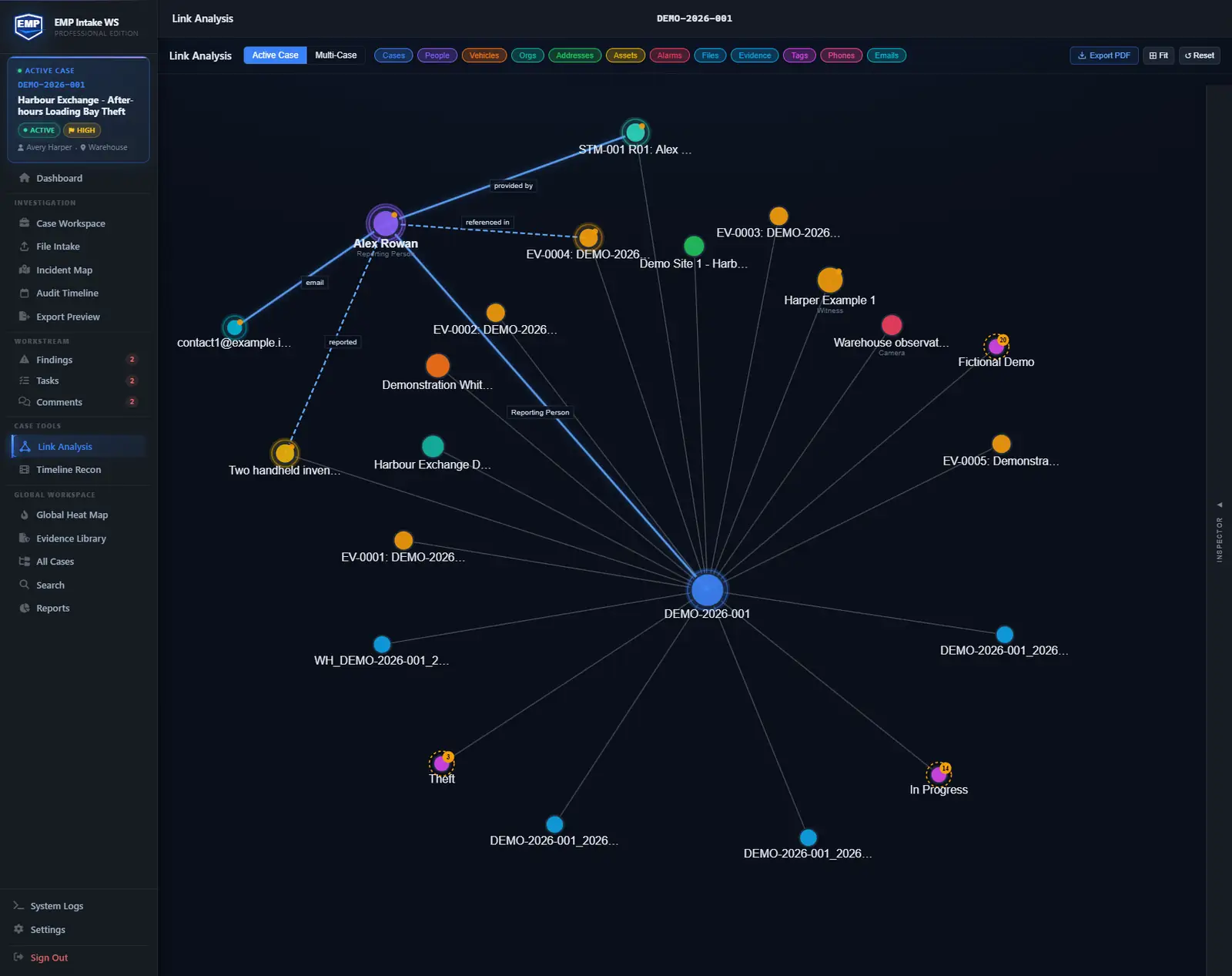
Professional's Link Analysis maps how the people, evidence, and entities in a case connect. Filter by entity type (people, vehicles, assets, places, files, evidence), drill into any node, and let a count badge flag the entity that ties the most threads together. Every node is typed and color-coded, and the graph exports as a PDF for hand-off.
5. The shared spine: four surfaces, one integrity model
Case Workspace, Timeline Recon, Incident Maps and Link Analysis belong to the same case. Each keeps the records and relationships its workflow supports; a shared case does not mean every edit updates every view. Supported actions are recorded with attribution and timestamps. Include an Audit Timeline report with the export when the reviewer needs that recorded history. Files are hashed (SHA-256) on intake and originals are never overwritten; working copies link back to the source hash. Include the manifest so a recipient can check packaged files against the recorded hashes.